
A stale signal timeout is the maximum age a trade alert can reach before a copy-trading or snipe bot discards it instead of acting on it. As a rule of thumb, ultra-fast scalps need a window under 60 seconds, intraday and wave-riding entries tolerate minutes, and swing-style copy trades can often accept longer timeouts. The right number depends on how fast your edge decays, not on a single default setting.
TL;DR:
- Setting a stale signal timeout should match how quickly your trading edge decays, with scalping under 60 seconds and swing trades tolerating 10 to 30 minutes or more.
- Always pair age limits with a price-drift threshold to avoid acting on signals that are chronologically recent but economically outdated.
- Regularly review and adjust your timeout settings based on current market volatility, rather than relying on a static default or initial configuration.
- Use detailed logging of signal timestamps and fulfillment rates to identify silent failures and distinguish between signal lateness and bot ignoring valid signals.
- Testing in paper mode with real-time or historical data helps calibrate timeout parameters and confirms that signal flow remains fresh and accurate.
Table of Contents
- What Is a Stale Signal Timeout in Copy-Trading Systems?
- How Do You Set a Timeout for Your Trading Strategy?
- How Do You Monitor Signal Flow to Catch Silent Failures?
- What Are the Most Common Causes of Stale or Ignored Signals?
- How Does Network Latency Affect Signal Staleness?
- What Do Stale Signal Scenarios Look Like Across Platforms?
- What Are the Best Practices for Configuring Timeouts?
- How Do Timeout Approaches Compare Across Trading APIs?
- Snipethem's Approach to Reducing Staleness Risk
- The Real Problem With Most Stale Signal Advice
- Try It With a Short, Low-Risk Window First
- Sources
What Is a Stale Signal Timeout in Copy-Trading Systems?
A signal has three timestamps that matter: the last-triggered timestamp (when the underlying condition actually fired), the delivered time (when your bot or platform received the alert), and the action time (when an order actually hit the book). The gap between the first and the last is where money gets made or lost.
Staleness happens when that gap grows large enough that the price you'd get no longer resembles the price the signal was built on. SignalBots' trading glossary defines a stale signal as one acted on too late, after delivery lag or delayed execution has already invalidated the entry, and recommends checking timestamps against live price before firing. A meme coin that moved 8% in the 90 seconds between trigger and execution doesn't care how good the original call was.
Architecture drives a lot of this. Bots that poll a REST endpoint every few seconds inherit that polling interval as baseline latency, while shared SaaS execution queues can add further delay between when a signal lands and when an order actually executes. WebSocket-based ingestion cuts that lag substantially, but only when it's engineered correctly.
Three things widen the gap between signal and reality:
- Polling-based data feeds that only check prices every few seconds
- Execution queueing on platforms handling many users' orders at once
- No price-drift check, so the bot fires on a price that no longer exists
That's the entire reason timeout settings exist.
How Do You Set a Timeout for Your Trading Strategy?
The timeout window should match how fast your strategy's edge decays, not a platform's default. Scalp entries on high-volatility meme coins lean on price action that can invalidate itself within seconds, so a timeout above 60 seconds usually does more harm than good. Intraday or momentum-wave setups have more room, since the thesis behind the trade holds for minutes rather than seconds. Swing-style copy trades, where you're mirroring a trader's multi-hour or multi-day position, can tolerate 10 to 30 minutes or longer without meaningfully changing the outcome.
Age alone isn't the full picture. Pairing a timeout with a price-drift tolerance (a percentage or tick threshold) catches signals that are technically fresh by the clock but already invalid by price. A signal that's 20 seconds old but references a price the market left behind five seconds ago is just as stale as one sitting for two minutes.
Before trusting any timeout setting, run through this checklist:
- Confirm the platform exposes a last-triggered timestamp, not just a delivery timestamp.
- Identify the delivery channel (webhook, WebSocket, or polling) and its typical lag.
- Locate the maxLag or timeout parameter in your bot's configuration and set it deliberately.
- Add a price-drift threshold alongside the age limit.
- Run the configuration in paper mode before committing real capital.
Some webhook-driven systems, like OKX's Signal Bot integration with TradingView, ship with a maxLag default around 60 seconds and explicitly recommend raising it only for slower, less time-sensitive strategies. That default exists because most retail scalping falls apart past that mark.
Pro Tip: Set your timeout in paper mode first, then watch how often signals get rejected for staleness versus taken. If nothing gets rejected, your window is probably too loose for the strategy you're running.
For strategies built around fast entries, understanding how breakout windows relate to entry timing helps calibrate this more precisely than a generic setting ever will.
How Do You Monitor Signal Flow to Catch Silent Failures?
The scariest failure mode isn't a signal timing out. It's a bot that stops acting on signals entirely while showing no errors. One developer discovered a production bot had silently ignored valid signals for 41 days because nothing was logging the gap between opportunities seen and trades actually taken.
The fix is what's now called an Implementation Fidelity Check: logging opportunity counters separately from execution counters. A simple version tracks three numbers per strategy: signals seen, signals qualified (passed your filters), and signals taken (actually executed). When "qualified" climbs while "taken" stays flat, something downstream is silently consuming your signals.
Fulfillment rate (the percentage of qualified signals that convert into executed trades) is the single number worth watching. A drop in fulfillment rate is usually the first symptom that appears before anyone notices missed trades manually.
| Counter | Example log line | Alert condition |
|---|---|---|
| Seen | signal_seen: pair=SOL/USDC, ts=14:02:01 | N/A (baseline) |
| Qualified | signal_qualified: pair=SOL/USDC, ts=14:02:03 | Sudden spike with no matching "taken" events |
| Taken | signal_taken: pair=SOL/USDC, ts=14:02:04, lag=1.2s | Fulfillment rate falls below 90% |
| Rejected (stale) | signal_rejected: reason=age_exceeded, age=74s | Stale-signal ratio rises above your tolerance |
Alert hubs that track last-triggered timestamps reliably give you the audit trail to separate "the signal was late" from "the bot ignored a fresh signal." Both look identical from the outside without that logging in place.
What Are the Most Common Causes of Stale or Ignored Signals?
Most staleness complaints trace back to a handful of repeat offenders, and nearly all of them are fixable without contacting support.
- Outdated candle history that stops the strategy engine from re-evaluating conditions
- REST polling intervals wider than your strategy's decision window
- Execution queueing during high-volume periods on shared platforms
- Missing or misconfigured API parameters for timeframe or pair data
- Timezone or exchange calendar mismatches that shift timestamp comparisons
One documented case on the freqtrade GitHub issue tracker showed a bot missing valid signals because its candle history for a pair had gone stale, and reloading the configuration resolved it without any code change.
Quick fixes to try, roughly in order:
- Reload your bot's configuration to force a fresh data pull.
- Restart the ingestion service or data connection entirely.
- Switch from REST polling to a WebSocket feed if your platform supports it.
- Raise the maxLag or timeout parameter slightly, only if your strategy genuinely tolerates it.
- Confirm NTP sync and timezone settings match your exchange's clock.
If none of that resolves it, gather your last-triggered timestamps, delivery timestamps, and rejection logs before contacting support. Specific timestamps turn a vague "signals aren't working" ticket into a five-minute fix.
How Does Network Latency Affect Signal Staleness?
Network latency is the raw travel time between an event happening and your system learning about it. It compounds with every other delay in the chain, which is why a signal that looks instant on paper can still arrive stale in practice.
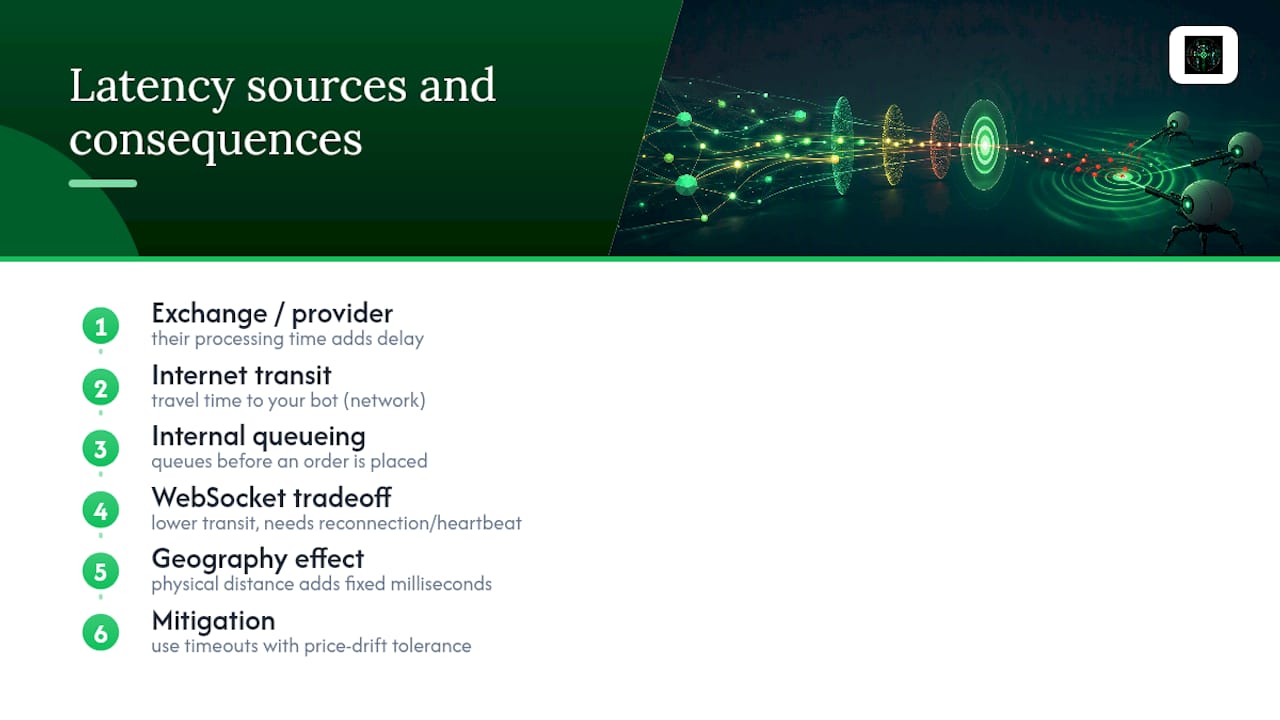
Three latency sources stack on top of each other in a typical retail setup: the exchange or data provider's own processing time, the transit time across the internet to your bot, and any internal queueing before an order gets placed. Each one is usually small alone. Together, on a token moving several percent per minute, they add up to a meaningfully different entry price.
WebSocket connections cut transit latency compared with polling, but they introduce a different risk. A developer warning about crypto trading bots makes the case plainly: stale data, not a flawed strategy, is what actually kills most bots' returns. WebSocket feeds need reconnection logic, sequence validation, and heartbeat checks, because a silently dropped connection can leave a bot trading against a price that stopped updating minutes ago, with no error thrown anywhere.
Geography matters too, though it's often overlooked. A bot running on a server physically far from the exchange's matching engine adds fixed milliseconds of latency that no amount of clever code removes. Retail traders rarely control this variable directly, which is one more reason a timeout with price-drift tolerance matters more than chasing a theoretically perfect latency number. You're managing the consequence of latency, not eliminating latency itself.
What Do Stale Signal Scenarios Look Like Across Platforms?
The mechanics of staleness show up differently depending on how a platform delivers signals.
On webhook-driven systems like TradingView-to-exchange integrations, a stale scenario usually looks like a signal arriving fine but sitting in an execution queue during a volume spike. The signal wasn't late. The order placement was. This is the exact queueing distinction that separates signal latency from execution latency, and it's why shared SaaS platforms need isolated pipelines to keep execution timing predictable during busy periods.
On self-hosted bot frameworks like freqtrade, staleness more often traces back to stale candle history rather than delivery lag. The bot has the compute power to act instantly, but it's evaluating conditions against outdated market data, so it never fires at all, or fires against a price that's already moved.
On copy-trading and snipe-bot platforms built specifically for meme coins, the failure mode tends to be different again: extreme volatility compresses the acceptable window down to seconds. This is exactly why pairing timeout limits with slippage awareness matters more for meme coin sniping than for slower-moving assets.
Each platform type fails in a way that reflects its architecture, not a universal cause. Diagnosing which failure mode applies to your setup is the first step toward fixing it rather than just widening the timeout and hoping.
What Are the Best Practices for Configuring Timeouts?
Configuring a timeout well means treating it as one part of a small system, not a lone number you set once and forget.
Start by matching the timeout to the specific strategy's decision window rather than a platform-wide default. A snipe bot chasing fresh Pump.fun launches and a copy trade mirroring a swing trader's multi-hour position have almost nothing in common in terms of acceptable delay, even if they run on the same account.
Pair the age limit with a price-drift tolerance every time. Age without a price check lets through signals that are chronologically fine but economically dead. Price-drift without an age check lets through signals that happen to still be near the entry price by coincidence, which isn't the same as being genuinely fresh.
Test every timeout change in paper mode before it touches live capital, and watch the fulfillment rate during that test, not just the win rate. A healthy fulfillment rate with a mediocre win rate is a strategy problem. A collapsing fulfillment rate is a plumbing problem, and no amount of strategy tweaking fixes plumbing.
Finally, revisit the setting periodically. Market volatility isn't constant, and a timeout tuned during a calm week can become dangerously loose during a volatile one. Real-time trade mirroring setups benefit from this kind of periodic review more than most, since the traders being copied often adjust their own pace as conditions shift.
How Do Timeout Approaches Compare Across Trading APIs?
Different trading APIs handle the same underlying problem with noticeably different defaults and philosophies.
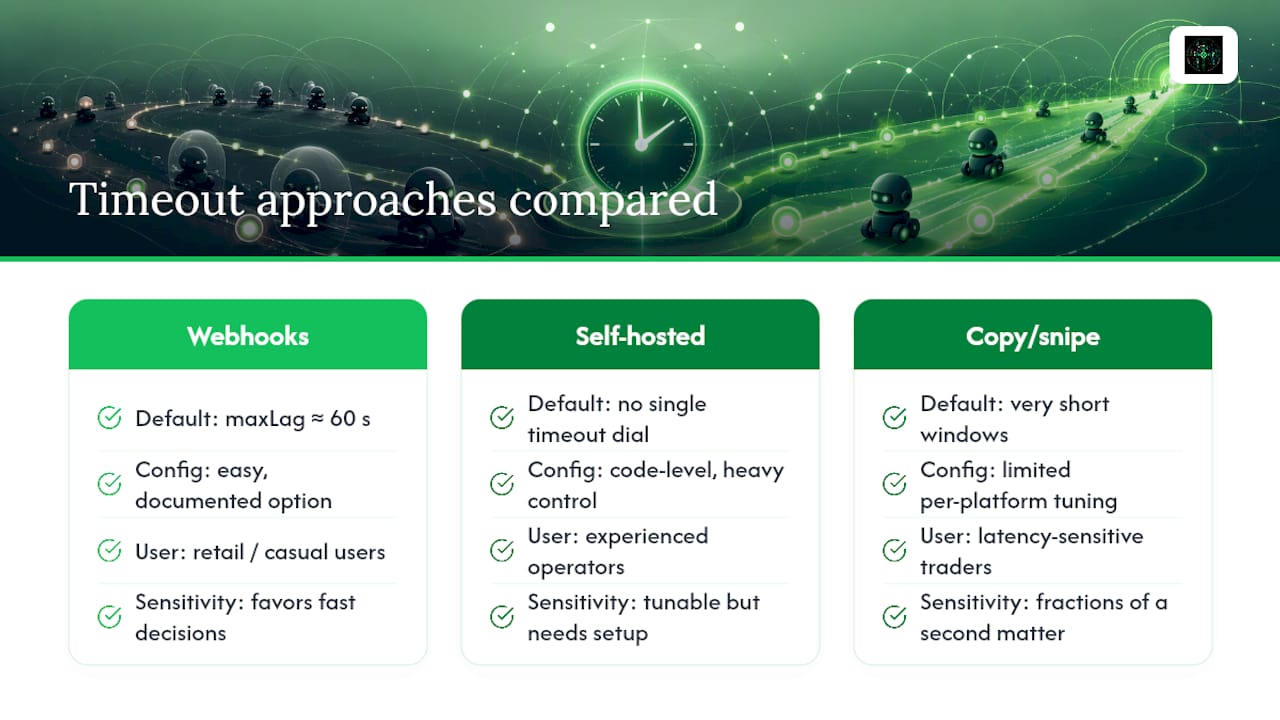
Webhook-based automation tools built around TradingView alerts, including the OKX Signal Bot integration, expose an explicit maxLag parameter with a conservative default near 60 seconds, built for retail users who may not know to configure it themselves. Increasing it is a documented option for slower strategies, but the default assumes fast decisions matter more than catching every possible signal.
Self-hosted frameworks like freqtrade take a more configuration-heavy approach: staleness is usually a byproduct of data freshness settings rather than a single timeout dial, which gives experienced users more control but demands more setup and troubleshooting when something breaks.
Copy-trading and snipe-bot platforms built around volatile meme coin markets tend to bias toward short default windows, because the asset class punishes slow decisions harder than most. Latency claims matter more here than in slower-moving markets, since even fractions of a second can separate a profitable mirror trade from a losing one.
None of these approaches is universally correct. A conservative 60-second default protects casual users from stale fills; a configurable, code-level system rewards traders willing to tune it precisely. The right fit depends entirely on how much control you want versus how much you're willing to manage yourself, and on whether your strategy runs on a market that moves in seconds or hours.
Snipethem's Approach to Reducing Staleness Risk
Snipethem's core design principle treats signal freshness as measurable, not assumed.
That's why Snipethem exposes both last-triggered and delivered timestamps on trade activity, rather than a single "signal received" marker. Traders using the platform's copy-trading tools or the Meme Coin Sniper Bot can see exactly how much lag, if any, sits between a trader's action and their own replicated order.
Before committing real capital to any timeout setting, run it in paper mode first. The copy-trading setup guide walks through onboarding step by step for exactly this kind of testing.
The Real Problem With Most Stale Signal Advice
Most guidance on stale signal timeouts treats it as a pure engineering problem: shave milliseconds, switch to WebSockets, tighten the window. That's not wrong, but it skips the part that actually causes most retail losses, which is traders setting a timeout once and never touching it again.
A timeout tuned for a calm market week becomes reckless during a volatile one, and a timeout tuned for a volatile week becomes needlessly restrictive once things settle. The traders who get burned aren't usually the ones with a badly configured maxLag parameter. They're the ones who configured it correctly six weeks ago and forgot markets change.
There's also a behavioral trap hiding inside the technical one. When a signal gets rejected for staleness, the instinct is to widen the window so it "works" again, rather than asking whether the strategy itself needs a faster pipeline. That instinct resembles revenge trading more than sound risk management: chasing the last missed trade instead of respecting why it was rejected in the first place. A rejected signal is data, not a bug to route around.
The honest fix isn't a smarter algorithm. It's treating your timeout and price-drift settings as living parameters that need the same periodic attention as your stop-loss levels, reviewed against current volatility rather than set once during onboarding and left alone.
— dang
Try It With a Short, Low-Risk Window First
Some copy-trading setups provide visibility into the actual gap between when a trader moves and when an order fires. Instead of guessing whether a stale signal problem is your timeout, your connection, or the platform itself, you can see last-triggered and delivered timestamps side by side and know exactly where the lag lives.
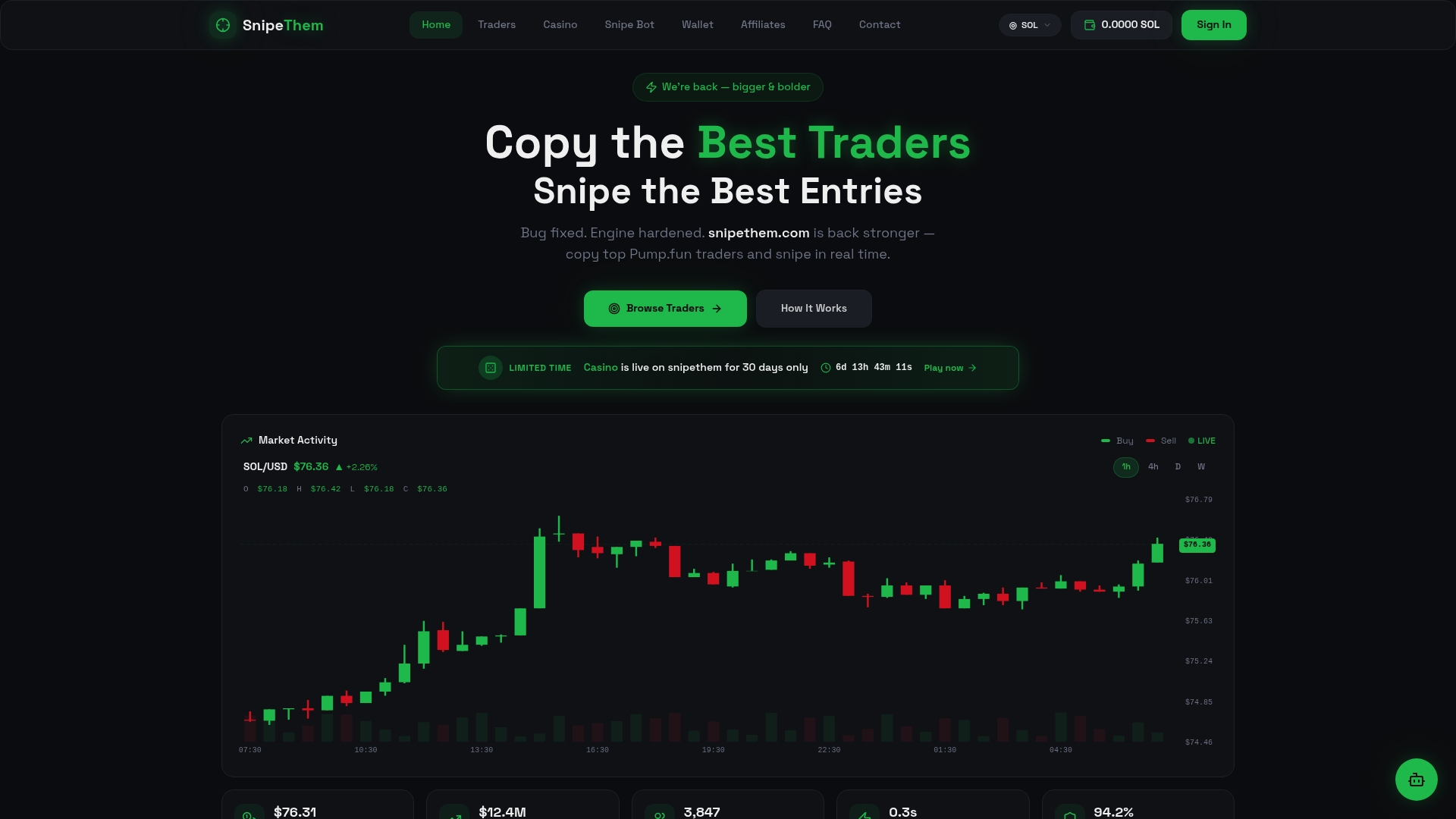
That visibility matters more with meme coins than almost anywhere else, since a few seconds of lag can turn a solid entry into a bad one.
The lowest-friction way to test this is a single 24-hour access window on a top trader's history through the Pump.fun traders page, run in paper mode first using the settings covered above. If the fulfillment rate and timestamp gaps look right, you'll know your timeout configuration is doing its job before a single dollar of real capital moves. Explore the full platform and bot lineup to see which access tier fits your strategy.
Sources
- My trading bot silently ignored signals for 41 days: The "Opportunity vs. Execution" logging that saved me
- Bot Missing Signals Due to Outdated History for Pair BTC/USDC — freqtrade issue
- Signal vs. Execution Latency in Crypto Bots - unCoded Blog