
For most beginners, the fastest safe route into copy trading is the MT5 Signals marketplace: subscribe to a vetted signal provider inside your existing MetaTrader terminal, confirm your risk settings, and run a short demo before funding a live account. If you want more control over sizing and which trades get mirrored, an investor-password feed paired with a separate trade copier gives you that flexibility without full technical setup. A dedicated trade copier or bridge is only necessary if you need to copy across different brokers or platforms, or you want custom routing logic, a marketplace can't offer.
Here's who each route actually fits:
- Time-poor beginners who want to start today: MT5 Signals marketplace, native to the platform, no extra software.
- Control-minded traders who want to size positions their own way: investor-password feed plus a copier app.
- Technical users running multi-broker or algorithmic strategies: a dedicated copier, EA, or bridge tool.
Whichever route you pick, the same three actions come first. Open (or confirm) your trading account and terminal, run a demo subscription for at least a few days to check that trades mirror correctly, and set your follower-side protections, meaning a maximum position size, a stop-loss rule, and a manual kill switch, before a single dollar goes live.
Key Takeaways
A safe copy trading setup depends on matching your technical route to your control needs, verifying it thoroughly on demo, and applying follower-side risk limits before any capital goes live.
| Point | Details |
|---|---|
| Pick your route first | Choose MT5 Signals for speed, investor-password plus copier for control, or a dedicated copier for cross-broker flexibility. |
| Map symbols before funding | Confirm broker symbol names match on both sides; mismatches are the leading cause of copy failures. |
| Use a VPS for uptime | A virtual private server keeps both terminals online continuously and reduces latency versus a home computer. |
| Size conservatively | Start around 1% of equity per trade using a percent-of-equity rule or a fixed lot multiplier, then adjust after verified results. |
| Diversify and demo-test | Split allocation across multiple providers and run at least a few days of demo testing before going live. |
| Consider a purpose-built marketplace | For meme-coin trading specifically, Snipethem's 24-hour trader access offers a faster path to live replication than building a custom MT5 copier. |
Table of Contents
- How Do You Set Up Copy Trading the Right Way?
- Which Copy Route Should You Use?
- Setting Up MT5 Signals: The Fastest Zero-Software Path
- Investor-Password and Trade Copier: Balanced Control Setup
- Dedicated Trade Copiers and EAs: Full Flexibility for Advanced Setups
- Technical Pitfalls That Break a Copy (and How to Prevent Them)
- Sizing and Risk Management for Followers
- How to Choose Who (and What) to Copy
- Demo Testing and Your Go-Live Checklist
- Costs and Starting Capital for Copy Trading
- Key Risks and a Straightforward Disclaimer
- Why Snipethem Fits Fast Meme-Coin Copy Trading
- Snipethem: Your Next Step Into Meme-Coin Copy Trading
- Sources
How Do You Set Up Copy Trading the Right Way?
Getting a copy trading setup right comes down to matching the technical route to how much control you actually need, then verifying it works before you fund it. Copy trading itself is a form of social trading: your account automatically replicates another trader's positions, adjusted to your account size, without you manually placing each order. It's built on top of your existing broker relationship, not a replacement for it, and IG's overview of copy trading is clear that automating the replication doesn't remove the risk to your capital.
That last point deserves emphasis before anything else. A copy trading setup does not create a safety net. It copies whatever the leader does, wins and losses both. The setup work you do (choosing the right route, sizing your positions conservatively, mapping symbols correctly) determines how much control you retain over your own downside. Everything that follows in this guide is built around that idea.
MetaTrader's ecosystem offers three genuinely different paths to a live copy: the built-in Signals marketplace, an investor-password feed into a third-party copier, and a dedicated trade copier or Expert Advisor (EA). Each one trades speed for control in a different way, according to SignalBots' breakdown of MT4 and MT5 copy trading.
Which Copy Route Should You Use?
The right route depends less on your trading knowledge and more on how much time you want to spend on setup versus how much control you need over sizing and symbol matching.
| Route | Speed to live | Control level | Broker lock-in | Technical complexity |
|---|---|---|---|---|
| MT5 Signals marketplace | Fastest (same day) | Low to moderate | High (single broker/terminal) | Low |
| Investor-password + copier | Moderate (1 to 3 days) | High | Moderate | Moderate |
| Dedicated trade copier/EA | Slowest (several days) | Full | Low (cross-broker capable) | High |
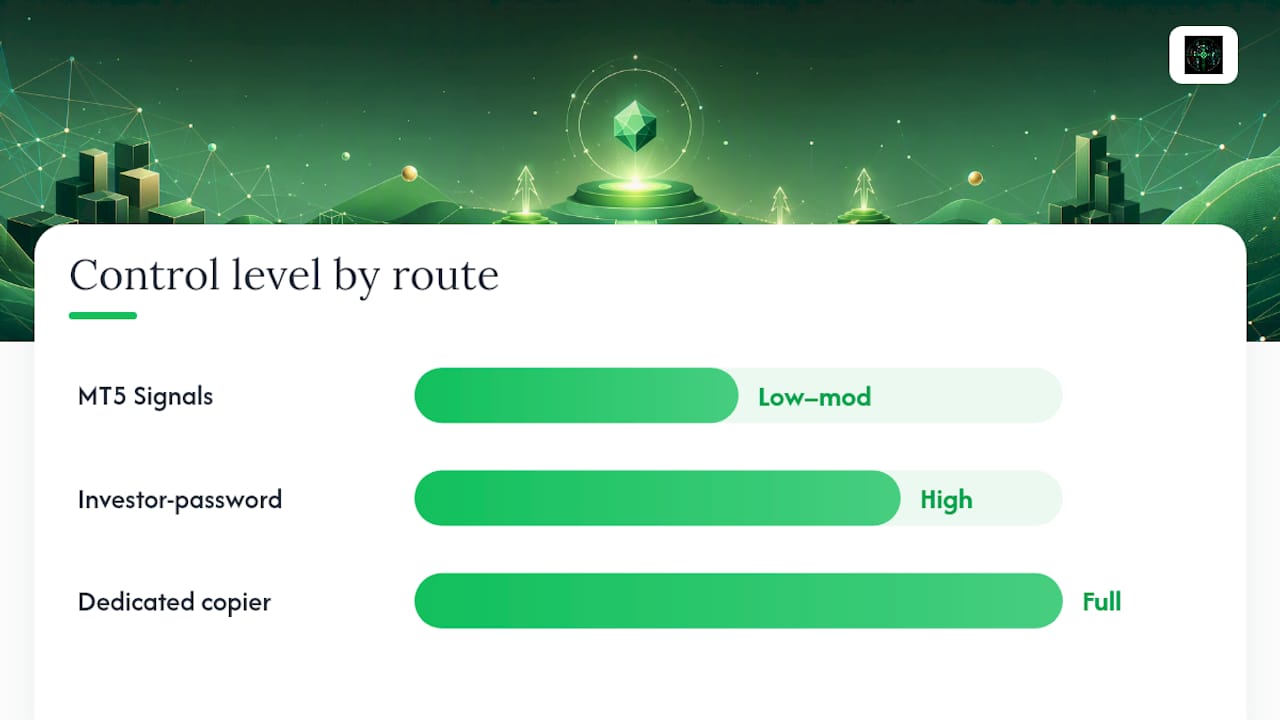
The MT5 Signals marketplace wins on convenience. It's built into the terminal you probably already have, requires no extra software, and lets you subscribe to a provider in a few clicks. The tradeoff is that you're locked into whatever broker hosts your MT5 account, and your control over exact sizing rules is more limited than a standalone copier gives you.
An investor-password feed into a separate copier splits the difference. You get read-only access to a source account's trades, run them through a copier you configure yourself, and gain much finer control over lot sizing, symbol filters, and risk limits. It takes more setup time but rewards you with a setup that's actually yours.
A dedicated trade copier or bridge tool is the advanced option, and it's the one Coin Bureau's review of copy-trading platforms points to when describing why some traders skip marketplace convenience entirely: they want fine control over sizing, symbol mapping, and syncing across multiple brokers that a built-in marketplace simply can't offer.
For meme-coin traders specifically, where speed and trader selection matter more than cross-broker flexibility, a purpose-built marketplace like Snipethem's trader listings solves a different problem than MT5 Signals does: it's built around Pump.fun's fast-moving trader pool rather than forex or equities, so the "which route" question for a meme-coin follower often comes down to marketplace access speed rather than MetaTrader compatibility.
Setting Up MT5 Signals: The Fastest Zero-Software Path
MT5 Signals works by connecting your live or demo account to a provider's published trade history inside the terminal itself. Once you subscribe, every new trade the provider opens gets replicated into your account, scaled to your balance and the risk settings you choose during subscription.
Here's what the process looks like in practice. Open the Signals tab in your MT5 terminal, browse or search for a provider, and review their published statistics: growth percentage, drawdown, number of subscribers, and trading frequency. Subscribing costs a fee in most cases, either flat or a percentage of profits, depending on the provider's terms. Once subscribed, you set a risk multiplier that scales the provider's position sizes to fit your account, then confirm the subscription.
Before you subscribe to anyone, run through a short broker checklist:
- Confirm your broker is regulated in a jurisdiction you recognize and check any minimum deposit requirements.
- Verify the instruments the signal provider trades are actually available on your broker's symbol list.
- Check whether your account type supports Signals at all. Some Islamic or micro accounts don't.
Demo testing matters here more than most beginners expect. Subscribe to the same provider on a demo account first, and specifically confirm two settings: your stop-loss tolerance (does the copier respect a max-loss-per-trade limit you set, or does it blindly mirror the provider's own stop placement?) and your slippage tolerance, which determines how far price can move before your copied order is rejected or filled at a worse price.
Pro Tip: Before your first live subscription, run a 48-hour demo test and manually check that at least three copied trades match the provider's published entry price within your slippage window. If the fills are consistently off, the mismatch is almost always a symbol-naming issue between your broker and the provider's, not a problem with the Signals engine itself.
Investor-Password and Trade Copier: Balanced Control Setup
This route gives you meaningfully more control than a marketplace subscription, at the cost of a slightly longer setup. The mechanics are straightforward once you understand the sequence.
- Get the investor password from the source account. Every MetaTrader account has two passwords: a master password (full trading control) and an investor password (read-only view access). You only ever need the investor password to copy someone's trades.
- Log the source terminal in read-only mode. Open a separate MetaTrader terminal instance, log in using the investor credentials, and confirm you can see live positions but cannot place trades.
- Install and point your copier software at that terminal. Most copier tools run as an EA or standalone application that watches the source terminal and replicates opened and closed positions to your live account.
- Set your sizing rules and symbol mapping. Decide whether you're using a fixed lot multiplier or a percent-of-equity rule, and map every traded symbol between the source and your own broker.
- Run demo tests before going live. Point the copier at a demo account first and let it run through several real trading sessions to confirm trades mirror correctly and on time.
The configuration checklist worth double-checking before you trust this setup with real money: are you certain you were given the investor password and not the master password? Is the source terminal pointed at the correct server, not a demo server by accident? Does the account number match what the provider actually told you?
Pro Tip: Never accept a master password from anyone offering to let you "copy" their account. A master password gives full trading and withdrawal-adjacent control, not read-only access, and legitimate copy-trading providers never ask for it. If someone sends you a master password instead of an investor password, treat that as an immediate red flag and walk away.
Scale your positions using either a fixed multiplier (copy 0.5 lots for every 1 lot the source trades) or a percent-of-equity rule (risk the same percentage of your balance the source risks of theirs). The percent-of-equity approach adapts better as your account grows or shrinks, while a fixed multiplier is simpler to reason about when you're just getting started.
Dedicated Trade Copiers and EAs: Full Flexibility for Advanced Setups
A dedicated copier, whether it's a standalone EA, a bridge application, or a cross-platform tool, exists for one reason: you need control that the marketplace and investor-password routes can't give you. That usually means copying across different brokers entirely, running custom filters on which trades get copied, or synchronizing multiple follower accounts from one source simultaneously.
Installation starts with matching EA versions between source and destination terminals. A copier EA built for MT4 won't run natively on MT5, and mismatched versions are a common reason a copy setup silently fails on day one. Once the EA is installed on both sides, you need to explicitly enable algorithmic trading in the terminal settings. MetaTrader disables this by default, and a copier that can't execute algo trades will sit idle without any obvious error message.
Symbol mapping deserves its own attention here because it's the single most common cause of a broken copy, according to SignalBots' technical breakdown. Brokers append suffixes and prefixes to standard symbol names for their own internal reasons: EURUSD might appear as EURUSD.m, EURUSDpro, or m.EURUSD depending on the broker. If your copier's symbol map isn't filled in correctly for every pair you intend to trade, trades either fail to copy or copy onto the wrong instrument entirely.
A VPS (virtual private server) matters more for this route than any other, because a dedicated copier typically needs both terminals running continuously. If your home computer sleeps, loses internet, or restarts for a Windows update, the copy stops the moment your terminal goes offline. Running both terminals on a VPS instead keeps them online around the clock and, just as important, reduces the latency between the source trade and your copied execution, since the server sits closer to the broker's own infrastructure. A partner resource like SafeFly's hosted testing guide walks through what hosted, always-on copy environments look like in practice.
Pro Tip: Check your VPS clock sync against your broker's server time before your first live session. A drift of even a few seconds between terminals can cause pending orders to trigger at the wrong price, especially around high-volatility symbols where the market can move meaningfully in that window.
Technical Pitfalls That Break a Copy (and How to Prevent Them)
Most copy trading failures aren't dramatic. They're small technical mismatches that quietly cause your account to drift from the source account's actual performance. The five that come up most often:
- Symbol-mapping mismatches, where your broker's naming convention doesn't match the source's, so trades fail silently or hit the wrong instrument.
- Latency and VPS downtime, where a sleeping computer or slow connection delays your copied order past a useful entry price.
- Different broker fills and slippage, since two brokers rarely fill the same order at the exact same price, especially during fast markets.
- Timezone and market-hours mismatches, particularly relevant if the source and follower brokers use different server times or trading session hours.
- Mismatched leverage or margin mode, where the source account runs at a leverage ratio your account either can't match or handles differently, distorting position sizes.
The preventive checklist is short but non-negotiable before funding a live follower account. Map every symbol you intend to copy, in both directions, before your first live trade. Run both terminals on a VPS rather than a home computer. Test at least one pending order on demo to confirm it triggers correctly across both accounts. Set a defined slippage window in your copier settings rather than leaving it unlimited. Confirm your margin mode and leverage setting match closely enough that position sizes scale the way you expect.
Before funding the account for real, run one final verification test: place three small demo trades through the full pipeline, from source signal to your account's execution, and manually check the entry price, size, and timing against the source. If all three land within your slippage tolerance and the correct symbol, you're ready to move to live capital.
Sizing and Risk Management for Followers
Position sizing is where most new followers either protect themselves or quietly blow up their account, and the two most common approaches work very differently.
A percent-of-equity rule sizes each copied trade as a fixed percentage of your current balance, typically somewhere in the 1% to 3% range per position. If the source trader risks 2% of their account on a trade and you're using a percent-of-equity rule at the same ratio, your position scales automatically as your balance grows or shrinks. This approach adapts well over time but requires your copier to support equity-based scaling rather than fixed lots.
A lot multiplier approach is simpler: you set a fixed ratio, say, copying 0.3 lots for every 1 lot the source trades, and that ratio stays constant regardless of how your balance moves. It's easier to understand and predict, but it doesn't self-adjust, so you'll need to revisit the multiplier periodically as your account balance changes meaningfully.
For most beginners, starting with a percent-of-equity rule around 1% per trade, then adjusting upward only after a few weeks of consistent, verified performance, keeps early losses small while you confirm the setup actually works as intended.
Beyond sizing, a handful of risk settings belong on every follower account from day one:
- A per-trader max drawdown limit that pauses copying automatically if losses exceed a threshold you set.
- A per-order stop-loss ratio, even if the source trader doesn't always use one themselves.
- Defined take-profit settings where the copier supports them, rather than leaving positions to run indefinitely.
- A slippage limit that rejects fills too far from the intended entry price.
- A manual kill switch you can hit instantly, plus an automated max-loss trigger that acts even if you're away from your screen.
Pro Tip: Set your automated max-loss trigger slightly tighter than you think you need. New followers consistently underestimate how quickly a string of losing trades from an unfamiliar strategy can compound, and a kill switch that triggers a little early costs you far less than one that triggers too late.
How to Choose Who (and What) to Copy
Picking a trader to follow is arguably more important than which technical route you use to copy them, and it deserves the same level of scrutiny you'd apply before handing someone your money directly.
Start with the metrics that actually predict future behavior rather than just past luck. Review the provider's sample trades directly rather than trusting a summary statistic alone. Check their maximum drawdown, since a trader who occasionally shows huge gains but also occasionally loses 40% of the account isn't necessarily safer than one with steadier, smaller returns. Look at win rate alongside trade frequency together, not separately, since a high win rate built on dozens of tiny trades tells a different story than one built on a handful of large positions. Check average holding time to understand whether you're copying a scalper or a swing trader, since that materially affects how much slippage and latency will cost you. And check how many other followers are actively copying the same provider, since a sudden spike in followers can itself affect fill quality on the source side.
A few red flags should disqualify a provider outright, regardless of how good their headline returns look. Opaque or unverifiable trade logs are the biggest one: if you can't independently confirm the trades a provider claims to have made, you're trusting a marketing page rather than a track record. A forced-sync requirement that prevents you from applying your own follower-side sizing rules removes exactly the risk control you're trying to build. Unusually high leverage used without clear disclosure is a common way providers manufacture impressive short-term returns while quietly loading up the account with risk. A sample history of only a few days or weeks simply isn't enough data to judge consistency.
Before committing capital to any provider or marketplace listing, ask directly: is there a minimum investment or lock-in period? Does the platform force synchronization that overrides your own risk settings? Are account-level profit and loss figures visible and verifiable, or only summarized?
Pro Tip: Treat a provider's stated win rate with real skepticism if you can't see the underlying trade-by-trade data. A trader who wins 90% of trades but takes outsized losses on the remaining 10% can still be a net loser over time, and that math only becomes visible once you look past the headline number.
Demo Testing and Your Go-Live Checklist
A structured, time-boxed demo period turns copy trading from a leap of faith into a verified setup, and it doesn't need to take more than a few days if you're disciplined about what you check.
- Day 1: Confirm symbol mapping and initial connection. Verify every symbol you intend to copy resolves correctly between the source and your account, and confirm the copier connects and stays connected.
- Day 2: Test slippage and forced-sync behavior. Watch how your demo account handles fast-moving trades, and confirm your own sizing rules aren't being overridden by a forced-sync setting.
- Day 3: Verify copier uptime and check three completed trades. Confirm the copier stayed online through the full session, then manually check entry price, size, and timing on three separate trades against the source.
- Before going live: Fund the account to your planned allocation only. Don't deposit your full intended capital at once; start with the portion you've decided to allocate to this specific provider or strategy.
- Apply your sizing rules and protections. Set your percent-of-equity or multiplier rule, your stop-loss and partial-close settings, and confirm your kill switch is active.
- Verify VPS uptime one final time, if you're using one, and confirm both terminals are logged in and synced before the market session you're targeting.
- Plan your monitoring cadence for week one. Decide in advance how often you'll check the account: daily is reasonable for the first week, tapering to a few times weekly once you've confirmed stable behavior.
The first 24 to 72 hours after going live deserve closer attention than any later stretch. Watch specifically for miscopies, meaning trades that opened on the source account but didn't mirror correctly on yours, and treat even one unexplained miscopy as a reason to pause and investigate before it happens again with real size behind it.
Costs and Starting Capital for Copy Trading
Copy trading setups carry a mix of upfront and ongoing costs that are easy to underestimate before you've actually gone live. Marketplace subscriptions typically charge either a flat fee or a pay-per-access model; a dedicated copier or EA may involve a one-time software cost; and if you're running a VPS for uptime, that's a recurring monthly expense on top of everything else. Some providers also charge performance fees on profitable trades, separate from the base subscription cost.
Minimum deposits vary by broker and provider, but DayTrading's guide to copy trading for beginners notes that some platforms allow starting minimums as low as $10, though the same guide is emphatic that beginners should diversify across multiple providers rather than concentrating everything with one trader, and size each allocation conservatively regardless of how low the minimum goes.
A practical starting range for a true beginner is a small allocation you're genuinely comfortable losing entirely, split across two or three providers rather than one, with room left over to add capital gradually once you've confirmed the setup performs the way you expected over several weeks. Diversification matters here for the same reason it matters in any portfolio: a single provider having one bad month shouldn't be able to wipe out your entire copy trading allocation.
Hidden costs deserve a mention too, since they erode returns quietly rather than showing up as a line-item fee. Slippage on fast-moving instruments, particularly relevant for crypto and other volatile asset classes, can meaningfully affect your actual fill price versus the source's. Withdrawal and funding fees vary by broker. If your account currency differs from the instrument's quote currency, conversion fees can add up over many trades. Budget for all of these before assuming your demo-tested returns will translate directly to your live account.
Key Risks and a Straightforward Disclaimer
Copying a trader means inheriting their risk, in full, whether or not you understand the strategy behind their trades. Past performance, no matter how impressive the historical chart looks, is not a guarantee of future returns, and a provider's best month tells you very little about their next one.
This article is educational content, not financial advice. Copy trading involves real risk to your capital, and rules around trading, taxes, and financial services vary by country. Check your local regulations and speak with a qualified professional before committing significant funds to any provider or platform.
One practical piece of compliance advice applies everywhere regardless of jurisdiction: confirm your broker's regulatory status and actually read the product terms of any copy provider or marketplace before depositing meaningful capital. The few minutes that takes is cheap insurance against a platform whose terms don't match what its marketing implies.
Why Snipethem Fits Fast Meme-Coin Copy Trading
Snipethem is built around a narrower, faster-moving problem than general forex or equities copy trading: replicating the trades of top-performing traders on Pump.fun in real time, where meme-coin price action can move meaningfully within seconds rather than minutes.
The platform's core mechanic is a 24-hour access purchase: you pay in SOL to unlock a specific trader's trade history and replicate their strategy through an automated snipe bot for that window.
This setup fits a specific kind of user well:
- Meme-coin-focused followers who want exposure to Pump.fun trading activity without independently researching every new token launch themselves.
- Short-term snipers who need fast execution on volatile, fast-moving tokens where a slow copier would miss the move entirely.
- Beginners who want quick marketplace access to vetted trader histories rather than building a custom copier setup from scratch.
Even on a publisher-recommended platform, the same setup discipline covered throughout this guide still applies. Run a demo mindset before scaling up your allocation, and set your own follower-side limits, a maximum position size, and a personal stop point, rather than assuming any trader's past win rate guarantees your next 24 hours. Snipethem's live trader marketplace is worth reviewing with the same evaluation checklist covered earlier: sample trades, drawdown, and trade frequency, not headline returns alone.
[Author credentials and trading expertise of dang to be inserted]
Practitioner Note: What Actually Surprised Me Setting Up Followers
The workflow that ended up sticking, after a few false starts, was simple: pick one provider, run it on a demo for three full trading days, then go live with a small allocation and a tight kill switch before ever considering a second provider. What surprised me most wasn't the trading itself. It was how often a copy setup that looked broken turned out to be a symbol-naming mismatch rather than anything wrong with the strategy being copied.
The kill switch earned its place the first week it was live. A source account I was following hit an unexpected string of losses during a low-liquidity session, and the automated max-loss trigger closed the follower position well before the drawdown became serious. Without that setting active, the loss would have run considerably further before I noticed and intervened manually.
The other lesson was about latency, and it came from moving my copier off a home computer and onto a VPS positioned closer to the broker's servers. The difference in slippage on fast-moving trades was noticeable almost immediately, particularly on trades entered during volatile sessions where a second or two of delay meant a meaningfully worse fill.
Snipethem: Your Next Step Into Meme-Coin Copy Trading
If you've worked through the routes above and landed on wanting speed and simplicity over building a custom MT5 copier from scratch, Snipethem is built specifically for that. Where investor-password feeds and dedicated copiers demand real setup time, symbol mapping, and often a VPS subscription, Snipethem's marketplace model gets you from decision to live replication in the time it takes to browse trader statistics and purchase 24-hour access.
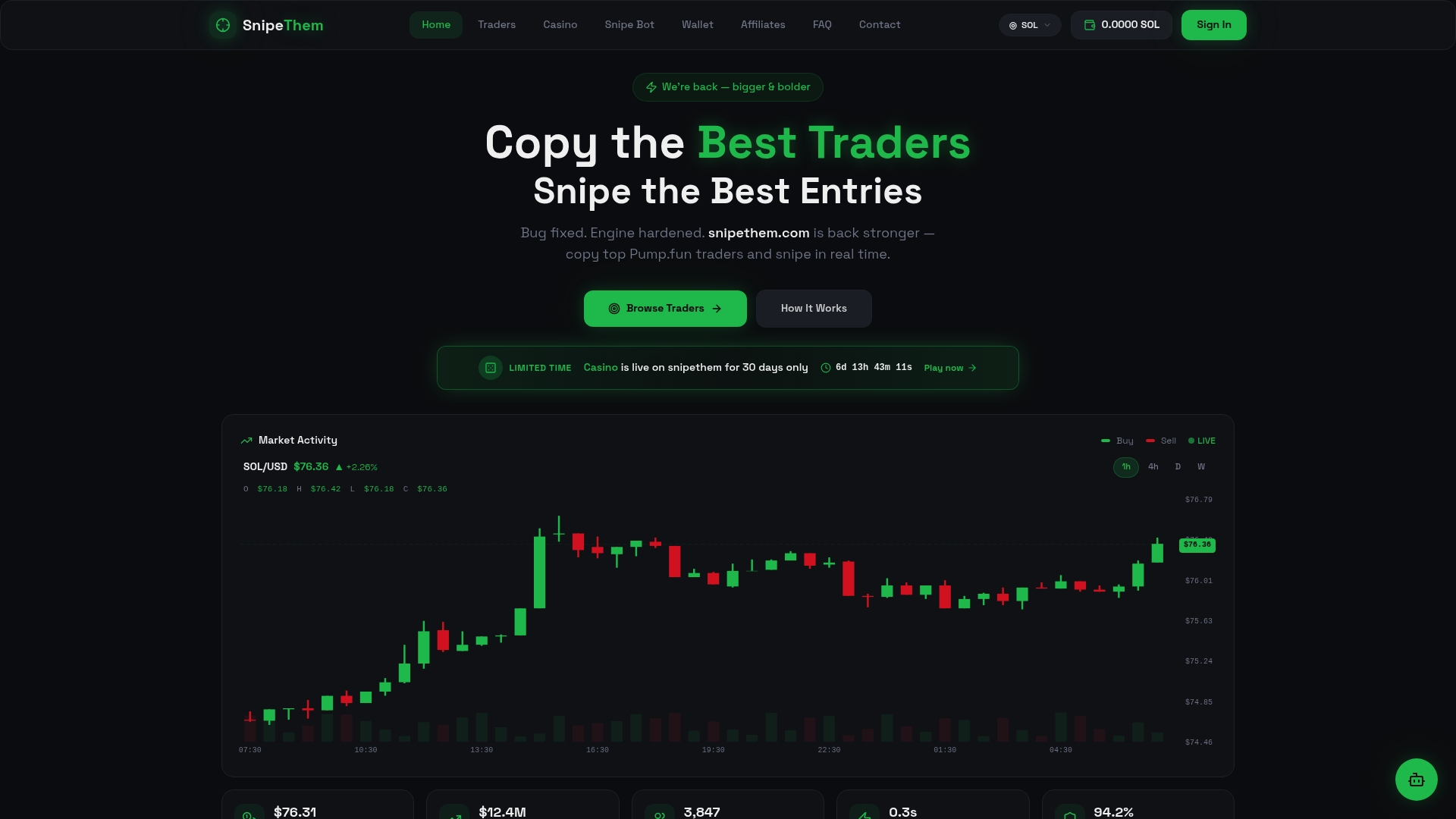
That access model matters for meme-coin traders specifically: you're not locked into a monthly subscription or a long-term commitment to a single trader whose recent hot streak might not continue. You pay for a 24-hour window, review the trader's performance, and decide fresh each time whether to renew. Browse the current top Pump.fun traders available for copy access, apply the same sample-trade and drawdown checks covered earlier in this guide, and start with a single 24-hour window before scaling your allocation. If you want to see the automation and bot configuration options behind the replication itself, the Snipethem platform overview walks through the full feature set.
Sources
For deeper technical configuration of MT4 or MT5 copiers, including symbol mapping and VPS setup, SignalBots' setup walkthrough covers the mechanics in more detail than fits in a single guide. For a broader definition of copy trading and the risk framing that applies across any platform, IG's copy trading explainer is a solid reference. If you're weighing minimum capital and diversification decisions, DayTrading's beginner guide goes deeper into starting-allocation strategy across asset classes. And for readers evaluating hosted testing environments before committing to a VPS provider, SafeFly's how-it-works page is worth a look.
Frequently Asked Questions
What is copy trading, in simple terms? Copy trading automatically replicates another trader's positions into your own account, scaled to your balance, without you manually placing each trade yourself.
How long does a copy trading setup take to go live? A careful setup, including demo testing, typically takes three to five days: one to three days of demo verification plus time to confirm your risk settings and fund the account.
Can I lose money with copy trading even if the provider is profitable? Yes. Timing differences, slippage, and symbol mismatches between your account and the provider's mean your results can differ from theirs, and copying inherits their risk regardless of your setup quality.
Do I need a VPS for copy trading? Only for the investor-password and dedicated-copier routes, where both terminals need to stay online continuously. The MT5 Signals marketplace doesn't require one since it runs through your existing terminal connection.
How much capital do I need to start copy trading? Some platforms allow minimums as low as $10, but a realistic starting allocation should be capital you're comfortable losing entirely, split across a few providers rather than concentrated in one.
This article is general information, not a substitute for advice from a qualified financial advisor. Consult a qualified financial professional about your own circumstances before acting on anything here.
- What is Copy Trading? - IG
- Copy Trading For Beginners 2026 | Tutorial and How to Start
- Bybit copy trading review – Coin Bureau