

A daily loss limit (DLL) is the fixed dollar or percentage cap on how much an account can lose within a single trading session. Platforms like Topstep, Apex Trader Funding, and FTMO enforce these caps automatically, and breaching one typically ends your trading day immediately. The single most important action: set a personal DLL below the firm's maximum before you place your first trade, and stop trading the moment it triggers.
Key Takeaways
| Point | Details |
|---|---|
| DLL definition | A fixed dollar or percentage cap on session losses, including unrealized P&L, commissions, and swaps. |
| Set below the firm maximum | Use 60–70% of the firm's hard limit as your personal DLL to preserve a slippage and commission buffer. |
| DLL triggers before max drawdown | Typical DLLs of 4–5% of account size bind before the maximum drawdown on most volatile sessions. |
| Auto-liquidation is immediate | Breaching the DLL flattens positions and blocks new trades; slippage on liquidation can push losses past the stated limit. |
| Behavioral rules matter as much as math | Declare cooldown rules before the session; never raise a personal DLL mid-session after a losing trade. |
Table of Contents
- What is a daily loss limit and how does it work at a glance?
- How is a DLL measured and enforced in real time?
- How do DLL rules differ between evaluation and funded accounts?
- How does a DLL compare to maximum drawdown and other risk limits?
- How do you calculate and set a sensible personal DLL?
- What do typical DLL tiers look like by account size?
- What happens when a DLL triggers and how should you respond?
- Common mistakes traders make with daily loss limits
- Research context: why DLLs matter and a brief U.S. tax note
- The part of DLL advice most guides skip
- Sources
What is a daily loss limit and how does it work at a glance?
A DLL can be expressed as a fixed dollar amount (e.g., $1,000 on a $50,000 account) or as a percentage of a reference equity value. Most programs measure it continuously against your account's live equity, not just closed trades.
- The limit typically includes closed P&L, unrealized (floating) P&L, commissions, and swaps — meaning an open position moving against you counts immediately.
- Reset timing varies: some platforms reset at midnight Central Time, others at midnight CE(S)T, and a few use end-of-day balance snapshots.
- A DLL breach usually triggers auto-liquidation of open positions, cancellation of pending orders, and a trading pause until the next session.
- The DLL is often the first rule to terminate a funded account — not the maximum drawdown.
That buffer absorbs slippage, commissions, and gap risk without leaving you dangerously close to the hard limit.*
How is a DLL measured and enforced in real time?
The measurement base determines everything. Three variants appear across major programs:
| Measurement Base | What It Tracks | Practical Effect |
|---|---|---|
| Percent of initial capital | Fixed dollar floor from account start | Floor never moves; easy to calculate |
| Percent of day-start equity | Resets each session to prior close | A profitable prior day raises the floor |
| End-of-day balance snapshot | Checked once at session close | Intraday equity spikes are invisible to the limit |
FTMO's Maximum Daily Loss is equity-based and includes open positions, commissions, and swaps, recalculated from a midnight CE(S)T snapshot. That means your floating losses at 11:59 PM CE(S)T set the reference for the next session, not your closed balance.
Enforcement is continuous on most platforms. The system checks live equity every tick. When equity drops to the DLL floor, the platform flattens all open positions, cancels pending orders, and locks new entries. Slippage on the liquidation itself can push the final realized loss slightly past the stated limit.
Worked example: You start a session with $100,000 in equity and a $2,000 DLL. You open a futures position that moves against you by $1,800 unrealized. Your equity is now $98,200 — $200 from the breach threshold. A news spike adds another $300 of adverse movement. The system triggers at $98,000 and flattens the position, even though the trade might have recovered minutes later.
This is why sizing to your planned stop is not enough. You must account for the worst plausible marked excursion of open positions, including slippage and gap risk, as prop-firm analyses confirm.
How do DLL rules differ between evaluation and funded accounts?
The rules are not uniform across account types, and assuming they are is one of the most common causes of unexpected terminations.
- Evaluation/combine accounts: On platforms like Topstep, the DLL may be optional at the time of purchase. Traders can choose whether to activate it during a combine. In live funded accounts, however, the DLL becomes automatic and non-negotiable.
- Purchase-set DLLs: Some programs lock the DLL at checkout. You cannot lower or raise it mid-session without contacting support, and in some cases the limit is immutable for the life of the account.
- Personal DLL (PDLL): Many platforms allow traders to set a personal daily stop below the firm's maximum. This PDLL can often be adjusted between sessions but not during one.
Topstep documents that triggering the DLL flattens open positions, cancels pending orders, and pauses trading until the next session. In a live funded account, repeated breaches can result in permanent termination rather than a simple pause.
The practical action: read the platform's rulebook before funding. Confirm whether the DLL is equity-based or balance-based, when it resets, and whether a PDLL can be modified between sessions.
How does a DLL compare to maximum drawdown and other risk limits?
Traders often focus on the maximum drawdown because it is the headline number. The DLL is usually the rule that actually ends accounts first, for a straightforward arithmetic reason.
A maximum trailing drawdown on a $100,000 account might be $3,000 — meaning the account survives as long as equity stays above $97,000 from its peak. But the DLL on the same account is often $2,000 per session. One bad morning can consume two-thirds of the total drawdown allowance before the maximum drawdown rule even comes close to triggering.
- Timing difference: The DLL is an intraday equity check. The maximum drawdown is often measured end-of-day or from the account's high-water mark. They operate on different clocks.
- Measurement difference: The DLL resets each session; the trailing drawdown accumulates across sessions and may never reset.
- Interaction risk: A trader who sizes positions to stay within the maximum drawdown may still breach the DLL on a single volatile session.
Prop-firm analyses confirm that the DLL ends more prop challenges than the maximum drawdown does, and that typical DLL settings cluster around 4–5% of account size. Size to the stricter, nearer constraint — which is almost always the DLL — and keep a buffer for slippage.
How do you calculate and set a sensible personal DLL?
A repeatable framework keeps the math straightforward.
- Identify the firm's hard DLL. This is the maximum the platform will allow before auto-liquidation.
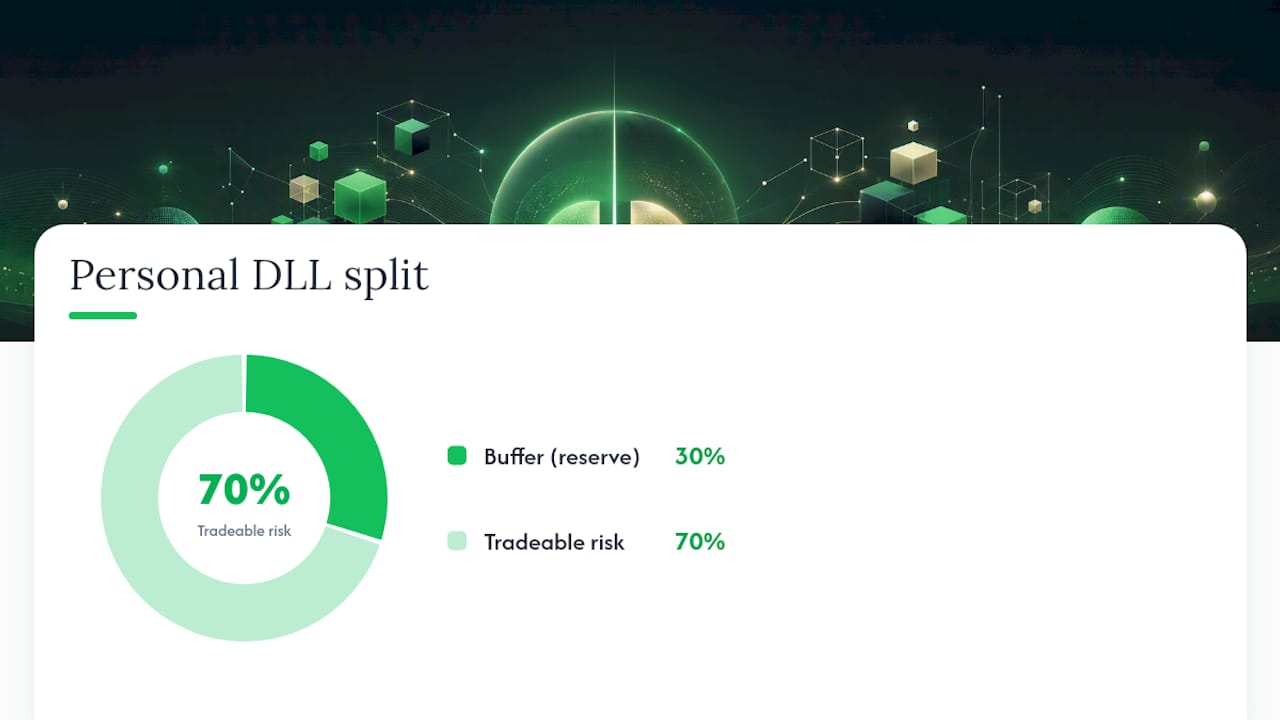
- Set your personal DLL at 60–70% of that figure. On a $2,000 firm limit, your personal stop is $1,200–$1,400.
- Reserve 25–35% of your personal DLL as a slippage and commission buffer. On a $1,200 personal DLL, keep $300–$420 in reserve. Your tradeable risk is $780–$900.
- Derive per-trade risk. Divide tradeable risk by the maximum number of full-risk losses you are willing to absorb in one session. Two full-risk losses before a pause is a common rule; three before a full lockout.
- Confirm the math includes unrealized exposure. If you run two positions simultaneously, their combined worst-case excursion must fit within the tradeable risk figure.
Worked examples:
- $50,000 account, $1,000 firm DLL: Personal DLL = $650. Buffer = $195. Tradeable risk = $455. Per-trade risk (2-loss rule) = $227.
- $100,000 account, $2,000 firm DLL: Personal DLL = $1,300. Buffer = $390. Tradeable risk = $910. Per-trade risk = $455.
- $150,000 account, $3,000 firm DLL: Personal DLL = $1,950. Buffer = $585. Tradeable risk = $1,365. Per-trade risk = $682.
The checklist for what to include in the DLL calculation: closed P&L, unrealized P&L on all open positions, commissions per round-turn, estimated slippage (especially around news), and swap/overnight charges if positions carry past the session boundary.
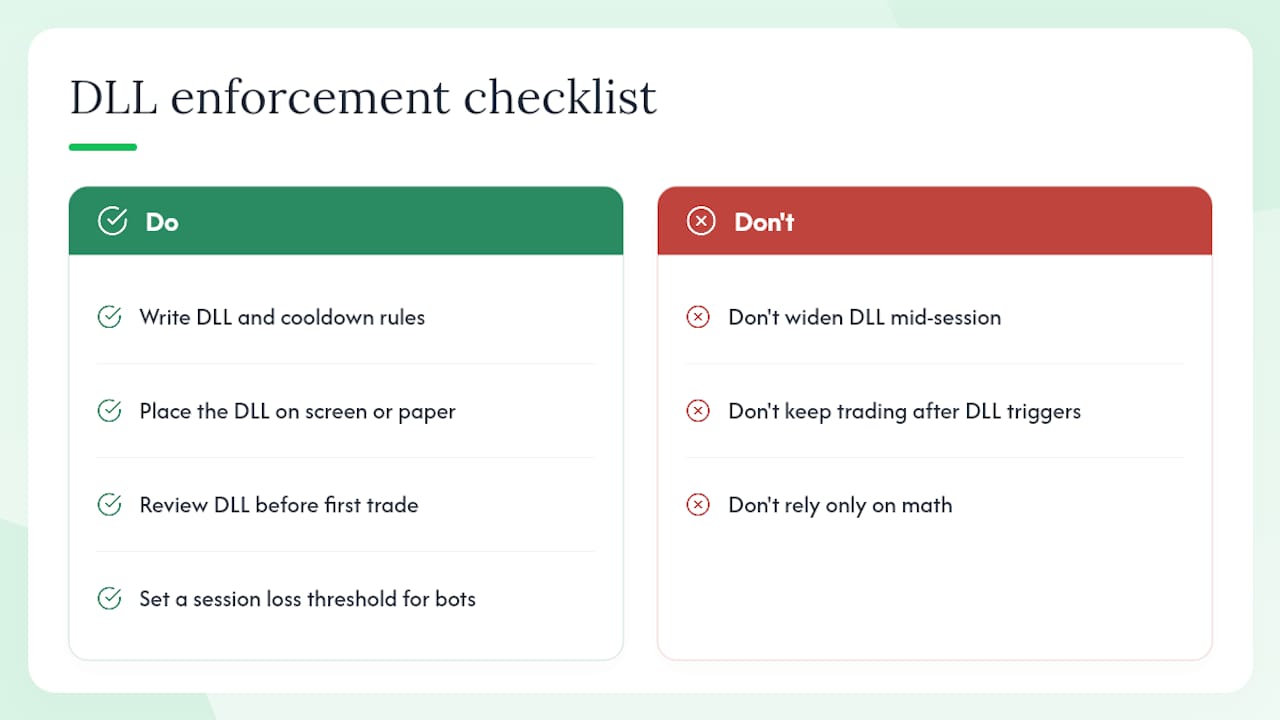
Pro Tip: Declare your cooldown rules before the session starts, not after a loss. Write them down: pause after two full-risk losses; full lockout when the personal DLL is reached. Nexural recommends treating these rules as hard, non-negotiable constraints — not guidelines to revisit mid-session.
What do typical DLL tiers look like by account size?
The figures below are drawn from common funded-program structures and are illustrative. Individual firms differ on measurement base, reset time, and whether trailing variants apply.
Some programs use a trailing DLL variant where the floor rises as the account grows, similar to a trailing stop. In those cases, the personal DLL should be recalculated each session against the updated floor, not the original account size. PDLLs on these programs may also require a mandatory increase after an auto-liquidation event before trading can resume.
What happens when a DLL triggers and how should you respond?
When the limit hits, the sequence is fast and largely automated.
- The platform detects that live equity has reached the DLL floor.
- All open positions are flattened at market; pending and stop orders are cancelled.
- New order entry is blocked for the remainder of the session.
- In evaluation accounts, trading typically resumes the next session. In live funded accounts, a breach may trigger a review or permanent termination depending on the program's rules.
After a trigger, the practical aftercare sequence matters as much as the rules themselves. Screenshot the P&L, note the time and the positions that were open, and record the sequence of events in a trading journal. Do not attempt to resume trading in a different account or instrument to "make back" the loss. Review whether the breach was behavioral (oversizing, revenge trading) or operational (slippage, gap, correlated positions). Adjust the PDLL before the next session if the review reveals a sizing error.
Some purchase-set DLLs are immutable — the firm's limit cannot be changed for the life of the account. Manual PDLLs, by contrast, may require a confirmed increase request after an auto-liquidation before the platform re-enables trading.
Common mistakes traders make with daily loss limits
The most frequent errors fall into two categories: behavioral and operational.
Behavioral traps:
- Treating the DLL as a "make-up" target rather than a hard stop. Traders who approach the limit and then increase size to recover losses are using the DLL in reverse.
- Negotiating the stop mid-session. Raising a PDLL after a losing trade to give the session "more room" defeats the purpose of having a limit.
- Ignoring unrealized exposure. A trader with three open positions may believe they are within the DLL, but the combined floating loss can breach it simultaneously.
Operational traps:
- Weekend and overnight gaps. Positions held past the session boundary can open the next day with a gap that immediately breaches the DLL before a single trade is placed.
- Correlated positions. Two long positions in correlated instruments magnify floating losses faster than either position alone would suggest.
- Misreading the trailing DLL. Assuming the floor is fixed when it actually trails upward leads to undersized buffers as the account grows.
Mitigations:
- Set the personal DLL before the session and do not modify it during trading hours.
- Check total open risk across all positions before entering any new trade.
- Avoid holding positions through major news events unless the position size is small enough that a 2x adverse gap still fits within the buffer.
- Use a pre-session checklist: confirm PDLL level, confirm per-trade size, confirm maximum simultaneous positions.
Nexural's framework and prop-firm rule analyses both identify the same root cause for most breaches: traders who set a DLL but treat it as a soft guideline rather than a hard operational constraint.
Research context: why DLLs matter and a brief U.S. tax note
Topstep reports that over 63% of traders have lost an account in a single day. That figure explains why funded programs treat the DLL as a non-negotiable feature rather than an optional setting. A single session without a hard cap can erase weeks of disciplined gains.
For U.S.-based traders, the tax treatment of trading losses depends on how the IRS classifies the activity. Individual investors face a $3,000 annual capital loss deduction limit against ordinary income, with excess losses carried forward. Traders who qualify for Trader Tax Status and make a timely mark-to-market election under Section 475(f) generally treat gains and losses as ordinary, removing the $3,000 cap and the wash-sale rule for business-related trading activity. The DLL itself does not change tax treatment, but traders who qualify as businesses may report losses differently and should confirm their status with a qualified tax professional.
- Capital loss cap for individuals: $3,000 per year against ordinary income (IRC § 1211).
- Section 475(f) election removes the cap for qualifying traders but requires a timely election and consistent mark-to-market accounting.
- Tax treatment does not affect the operational need for a DLL; it affects how losses are reported after the fact.
This section is general information, not tax or legal advice. Confirm your classification and election status with a qualified tax professional.
The part of DLL advice most guides skip
Most articles on daily loss limits stop at the math. Set it at X percent, size your trades accordingly, done. That framing treats the DLL as a calculation problem when the evidence suggests it is primarily a behavioral one.
The 63% single-day account loss figure from Topstep's platform data is striking not because it is high, but because it implies that most of those traders had access to the same sizing rules and still breached their limits. The math was not the failure. The decision to keep trading after the first or second loss — or to widen the personal DLL mid-session — was.
What the conventional advice underweights is the asymmetry between setting a rule and enforcing it under pressure. A DLL written in a spreadsheet before the session is a different object than a DLL you are staring at after two consecutive losses with 90 minutes left in the session. The traders who survive funded programs long-term are not necessarily better at analysis. They are better at treating pre-declared rules as immutable during the session, regardless of how the market looks in the moment.
The practical implication: the personal DLL and the cooldown rules that accompany it should be written down and physically visible during trading hours. Not in a platform setting buried two menus deep, but on screen or on paper, reviewed before the first trade. The DLL is only as effective as the trader's commitment to stopping when it triggers.
For traders using automated copy-trading tools, the same principle applies. Configuring a bot to replicate a top trader's entries without setting a session-level loss cap on the bot's activity is the operational equivalent of trading without a DLL. Before enabling automated replication on any platform, including Snipethem's top trader marketplace, set a session loss threshold that matches the personal DLL framework described in this guide.
This article is general information, not a substitute for advice from a qualified financial advisor. Consult a qualified financial professional about your own circumstances before acting on anything here.
Sources
The following platform help pages and IRS guidance were used to build this guide. Reading the original rules for your specific program is strongly recommended before trading.
- Daily Loss Limit in the Trading Combine and Express Funded Account
- Maximum Daily Loss — FTMO Academy
- How to Build a Daily Loss Limit That Actually Works
- Daily Loss Limits in Prop Trading Explained